

Make the Most Out of Your Next Migration Project

Recently, we've finished a migration of one of the frontend applications I work on from Backbone to React. This was an endeavor for a few months but we've ended up in a much better place, both from the product and engineering perspective. 🎉
In this article, I share a few points which have been critical to making this project successful for both engineers and managers. Adopting these strategies can make your next migration project as close to plain sailing as possible.
Create visibility
The process of software development, if done improperly, can be like a black box to product managers or owners. That might be especially true for migration projects which are often almost exclusively technical.
Remember, it's the managers' job to keep track of the progress. That way they can better plan for the future. So unless you create visibility over the migration project for them, there will be questions. A lot of them. That's natural.
Also, remember that if other teams are working on the same codebase, it's easy to get into conflicts on code level or, god forbid, feature level.
Here are a few things you might want to try.
- Split the work into manageable chunks. How you approach it depends on the scale and type of the project. The one that we did had three distinct phases - base functionality, complete functionality, and clean-up. Each phase had a particular end goal - after finishing the first phase other teams could start working in the migrated app, after the second phase we could release to production, and after the third, we could say the migration is complete. That allowed us to unblock other teams faster and give clear milestones we reached along the way.
- Create high-level estimates that account for uncertainty. The idea here is to put some ballpark estimates on the entire scope. Without that, nobody knows if you're looking at days, months, or years of work (and if you say years, perhaps you should revisit the previous point). In our project, we prepared high-level estimates for each phase of the migration. It's key to account for uncertainty, depending on how large the phase is, the quality of existing documentation, and tests. Once we were getting closer to the next phase of the project, we could put a more precise estimate on individual tickets within the phase with all the information we gathered.
- Communicate the progress. If you did the two previous points, you don't have to do much more. Your tasks and estimates should do most of the work for you here. But make sure other teams and engineers are also aware of the adventure you are about to embark on in advance so that there's no work planned in that area. Finally, be prepared for the unexpected along the way. There will always be this feature or complexity you weren't aware of. Communicate fast and communicate clearly. Discuss with the managers. Adjust the estimates if necessary. There's always a way to adapt to the situation, but only if we know the situation well enough.
This way your manager sleeps well at night, you get asked fewer questions and other teams can plan their work accordingly, so you don't get in the way of one another.
Know what you're doing
Before you touch anything, make sure you know the area you're about to migrate. Look for any pieces of documentation available related to that area. Read the tests that you have and validate how much confidence they could give you.
What also helped us in this project was having well-defined tickets. Since there wasn't much documentation, we often went feature by feature, investigating the existing code and transforming the findings into precise acceptance criteria.
One other thing I saw work well also is creating diagrams for more complex flows and logic. Written documentation is good, but visuals are often easier to traverse quickly. They will allow you and your team to understand the logic better, serve as a starting point for a discussion about potential issues and serve as documentation for the engineers to come.
Run towards rather than away
Getting rid of old code can be fun. Make sure, though, you're not only running away from something but running towards something. Knowing when to migrate and how to get it rolling is probably a topic for a separate article - Kent C. Dodds has a great blog post on business and engineering alignment. It's useful to transform the reasons for migration into specific goals.
Here are some of the things we were striving towards.
- Leverage existing architecture for handling a subset of views
- Unify our tech stack to move faster in the future
- Improve visual consistency by code reuse
Prepare a release plan
It's worth thinking about how you're going to roll out your changes long before this happens. This will inevitably influence the entire engineering process.
Most likely you don't want to hit all customers with your big change at once. If your company is using its product internally, roll out your changes there first and let them sit there for a while, monitoring what's happening. If everything's fine, go 1% of customers. Then maybe 5% to 10%, and all the way to 100%, each increment happening after a certain time. At any stage, if something goes wrong you should have an easy way to switch to the previous implementation. This is how you can manage the risk which all migration projects have.
But to be able to consider that, you have to have a process. Here are the two most common options.
- Feature flags. Your code contains both the old functionality and migrated one and you have a switch to choose the implementation you want your customers to see. It's key to make sure the two versions are fully separated to give you a secure fallback. You also have to remember to clean up the old implementation after successfully releasing to production.
- Canary releases. Your code contains only the migrated functionality, and if something bad happens you roll back to a version containing the old functionality. Here separation is baked into the process itself, but it's hard to maintain over a long time, particularly in an environment where not only your team is making changes to the product.
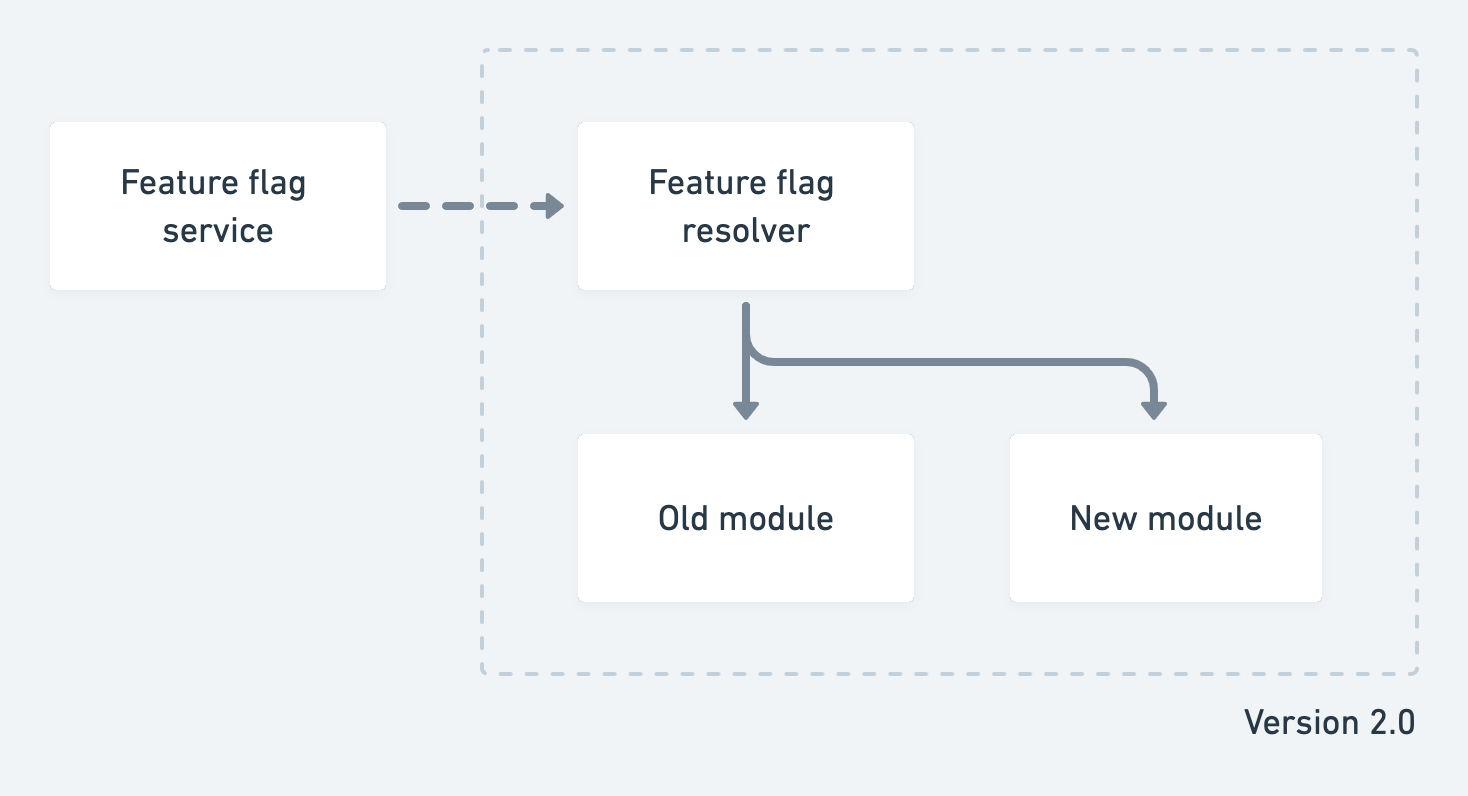
Feature flags diagram
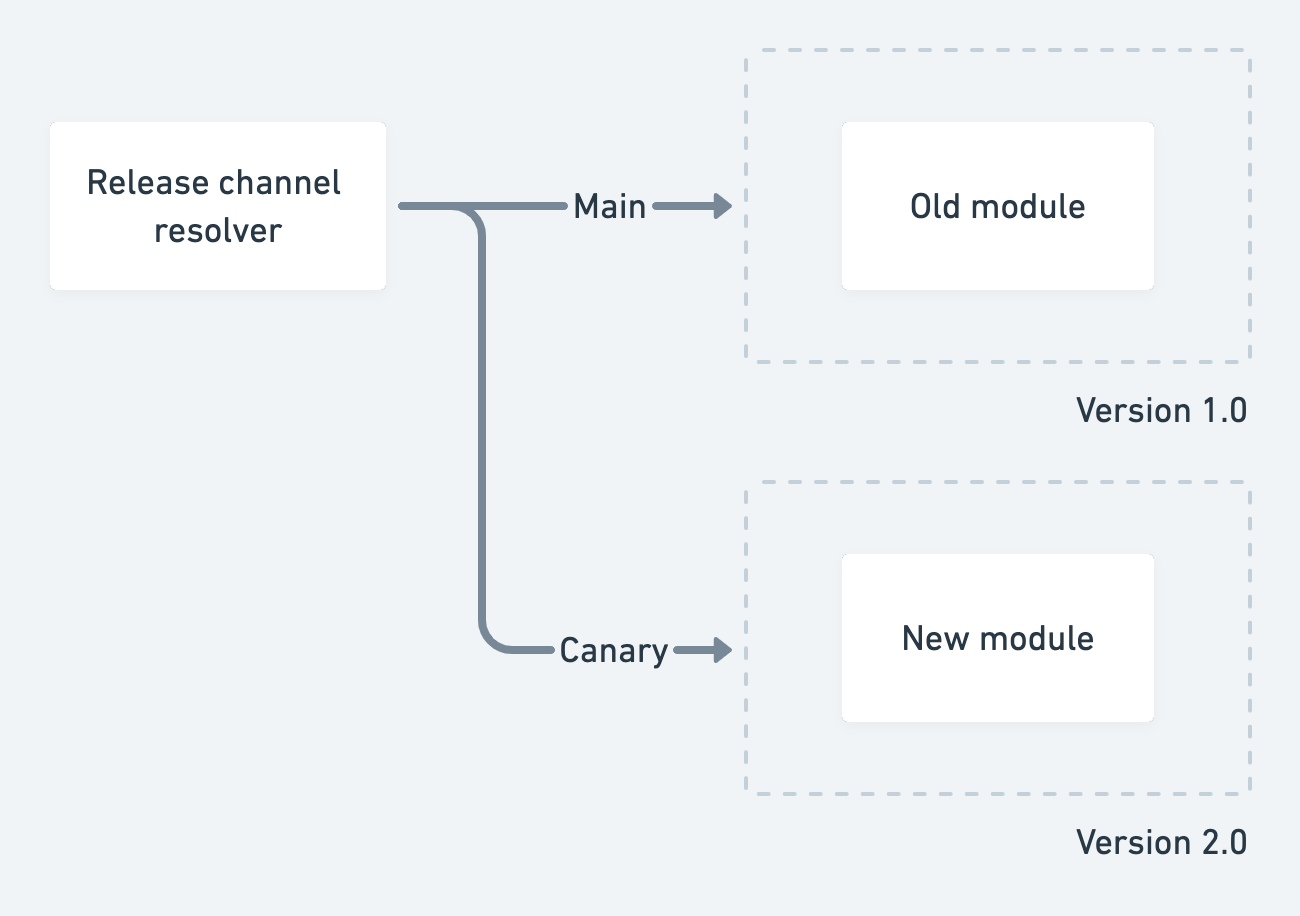 Canary releases diagram
We went with feature flags, but there's no right or wrong. It depends on your situation and requirements.
Having this risk management plan will actually slow down the development process. Think about the benefit-to-effort ratio but try to somehow isolate the new version from the old version. That gives you a way to fall back if something goes wrong, which might be more valuable than speed.
Narrow your focus
The bigger the area you want to migrate, the bigger the complexity.
If we're already doing a full rewrite, why don't we do X, Y, and Z as well.
Seems like a brilliant idea? Well, not really. Migrations already have a lot of complexity to them. With adding new functionality, you need to understand the business context, gather requirements, review designs, think about how to implement and test the solution. Don't spread yourself too thin and limit the number of functional changes.
But what migrations give you is a great opportunity to rethink any abstraction that you might have in the code. Are they useful? Did they speed up the migration process or only made things more complicated? Now is the time to add an abstraction where it's missing or remove a hasty one.
The last thing is technology. For us, the choice was pretty simple. React should be the core, as it is our framework of choice in all other apps. Always choose the tool with an appropriate time horizon in mind. Do your research and don't necessarily go for the new shiny technology. Choose what gives you and your team the highest return on investment given the quality of the tool and the expertise developers on the team have.
Automate testing
I saved perhaps the most important for last. As you see, there are already so many things to keep in mind, we didn't even talk much about making sure that we didn't actually break anything!
That's intentional. You shouldn't have to bother - your tests give you that confidence. Your job here is to evaluate existing tests and decide how much confidence they currently give you and whether that's enough.
For this project, unit tests that existed depended on too many implementation details so we could use them only as documentation. Thankfully, we had a decent suite of end-to-end tests which we could rely on. We also used this migration as an opportunity to write better integration tests for the app, using React Testing Library, and this decision already paid off.
Make sure you have tests to rely on.
Conclusion
I have to say that I really enjoy working on these types of projects. It's a fantastic feeling when things just work and you know that you can remove a ton of old code. Also, along the way we made a few strategic functional improvements that were fully engineering-driven - it was just easier to do things right with a new architecture. And that's a great sign. 🏆
To wrap it all up, here are the things to keep in mind.
- Create visibility. Make it easy for managers and other teams to know what you are doing. Communicate the progress.
- Know what you're doing. Get to know the area that you are going to be migrating.
- Run towards rather than away. Make sure your reasons for migrations are aligned with your goals for the project.
- Prepare a release plan. Think about how to safely push your changes to production and have a fallback.
- Narrow your focus. Limit the scope of functional changes, rethink abstractions, choose the technologies carefully.
- Automate testing. Make sure you have a solid suite of tests to give you confidence as you iterate.
Ultimately migration can be an excellent learning opportunity. It's worth asking what we can do now so that we don't have to go through another migration in the future. Or at least how you can make the process easier.
I hope it helps you make the most of your next migration project. Good luck!
Further reading and references
- Article by Jai Chakrabarti on The migration trap in software engineering
- Photo by Andrew Schultz on Unsplash
About the author
I help product teams build quality software and lead engineering efforts. Currently working at OpenSpace as a Senior Software Engineer.
Comments
Join the discussionNo comments yet. Be the first to comment.


